The WordPress SEO field guide
WordPress SEO.
From every angle.
Technical SEO, on-page SEO, and off-page SEO, connected in one practical guide.
Understand what to check, what to change, and how to tell whether the work is done. Follow one example from the first inspection to a plan you can use.

Chapter 01
How the three areas work together
Start with the problem you can observe, then choose the work that addresses it.
SEO is the work of making a website discoverable, understandable, and useful to people arriving from search. On a WordPress site, that work crosses several boundaries. A server has to deliver a page. The page has to answer a worthwhile question. Other people need a reason to discover it, use it, or reference it. A plugin can help with some of those tasks, but it cannot supply the business knowledge behind the answer.
Technical SEO deals with how pages are accessed, delivered, organized, and described to crawlers. On-page SEO deals with the purpose and contents of individual pages, including their titles, explanations, images, and links. Off-page SEO deals with relevant references and relationships outside your website. These are useful working categories. They overlap: repairing a broken destination for an external link is technical work with an off-page consequence.
This guide uses Google’s published documentation for Google-specific behavior. Other search services have their own systems. Google distinguishes crawling, indexing, and serving results, and does not guarantee that a page will pass through all three. A completed checklist therefore establishes what you inspected or changed, not a promised position in search. See how Google Search works.
Choose an entry point
If an important page seems absent from search, start with technical SEO. Establish which URL is affected and what evidence supports the diagnosis before rewriting it. If the page is accessible but fails to answer visitors’ questions, start with on-page SEO. If you have a genuinely useful resource and need to help relevant people find it, start with off-page SEO.
You can read the guide from beginning to end, but you do not need to complete every task before doing anything useful. Choose one important page, inspect it carefully, and keep a record. That first investigation often reveals whether a problem belongs to the content, a template, a plugin setting, or the hosting environment. The action plan turns those observations into work you can assign and verify.
The example we will follow
Our running example is a fictional garden-design business at garden.example. It has a garden-design service page, a guide to planning a small garden, and a seasonal planting resource. Its URLs, editorial changes, and outreach examples are teaching material. They are not customer results or a claim about what has ranked.
The example keeps the work connected. First we inspect whether the service page can be reached and interpreted. Then we improve the answer it gives a prospective customer. Finally we consider why a relevant organization might reference the planting resource. The same process applies to a software company, a publication, or a professional service, although their evidence and audiences will differ.
Start a simple record now: the page you care about, the question it should answer, the problem you observed, and the evidence you have. Leave unknowns blank. A useful SEO investigation makes those unknowns smaller instead of disguising them with a score.
The whole picture
Three areas. One useful website.
- Technical
Can the intended page be reached and interpreted?
- On-page
Does it answer the question and support the next step?
- Off-page
Who has a relevant reason to reference or recommend it?
Part 01
Technical SEO
Make the right pages accessible, understandable, and usable.

Chapter 02
Discovery, crawling, rendering, and indexing
Find the stage where a page needs attention before changing its content.
A page can exist in WordPress without being easy to find, fetch, or understand. Treat those as separate questions. Start with a URL, not a general statement that your site’s SEO is broken. Write down the exact address, including the protocol, hostname, path, and any parameters. Open it in a signed-out browser and note where you actually arrive.
Google describes discovery as finding URLs through sources such as links and sitemaps. Crawling retrieves a page; rendering processes how it appears, including relevant JavaScript. Indexing analyzes what was retrieved and how it relates to other content. Being found does not guarantee being indexed. Those distinctions come from Google’s description of Search.
Build a small evidence trail
For the example service page, record the requested URL, the final URL, the response status, whether the useful text is visible, and the page’s indexing controls. Then record how a visitor could reach it from another useful page. You now have observations that different people can reproduce. “The service page redirects to the old domain” is actionable. “The SEO score seems low” still needs interpretation.
Compare three views when the evidence disagrees: the response delivered by the server, the page after the browser has rendered it, and the search engine’s own inspection report. These views describe different moments or processes. A recent fix may appear in today’s browser while a report still describes an earlier fetch. Save dates with the evidence so that you do not undo a correct change merely because an older report has not caught up.
Google’s URL Inspection tool distinguishes information about the indexed version from a live test. A successful live test does not guarantee indexing or a particular search appearance. Use the inspection documentation to interpret the result you are looking at, rather than treating every green message as the same assurance.
Separate an isolated page from a template problem
Inspect another page of the same type. If both service pages lose their main text when rendered, investigate the shared template or delivery path. If only one page redirects incorrectly, inspect the rule and content attached to that URL. This comparison is usually more useful than changing several plugins at once.
For a small site, choose a home page, a service or product page, an article, an archive, and a known missing URL. Add a special template only when the site actually uses it. This is a diagnostic sample, not proof that every URL works. Keep expanding the sample when a finding points to a broader class of pages.
Decide what would count as a fix
Write the expected result before making the change. For example: “A signed-out request to the current service URL returns the intended page, with its main text and no unintended exclusion directive.” The verification is now concrete. You can ask a developer to inspect delivery or an editor to check meaning without expecting either person to solve an undefined search problem.
Afterward, save the new observation beside the old one. Record what changed, who changed it, and when. Keep indexing and traffic outcomes in a separate column. A repaired response is something you can verify immediately; a later search outcome needs its own observation and cannot be inferred from the repair alone.
Follow the evidence
A URL has several hurdles
- 01 / Discover
A link or sitemap makes the URL known.
- 02 / Fetch and render
The response and its content can be retrieved and processed.
- 03 / Index
The search engine evaluates the page and its relationship to other content.
- 04 / Serve
An indexed page may be selected for a relevant search.
Chapter 03
Robots controls and indexability
Give crawling, indexing, and access controls their separate jobs.
Before changing a robots setting, state the intended outcome. Do you want to stop a crawler from requesting a URL, keep an accessible page out of search, or prevent an unauthorized visitor from reading private information? Those are different requirements. Choosing a control because its label sounds protective can produce the wrong result.
Google’s robots.txt documentation describes it as a way to manage crawling. A blocked URL can still be known from links elsewhere. A page-level noindex, by contrast, instructs Google not to index a page, but the crawler must be able to retrieve that instruction. Blocking the same page in robots.txt can prevent that retrieval. See Google’s noindex guidance.
Inspect the output, not just the setting
Check the site’s robots.txt, the HTML robots meta tag, and any relevant response header such as X-Robots-Tag. Record all of them before choosing a fix. A setting in WordPress may be only one contributor to the response. An SEO plugin, custom code, a caching layer, or a server rule may also be involved. When controls disagree, identify their owners instead of adding another setting on top.
In WordPress, the Reading settings contain the search-engine visibility preference. WordPress documents this as discouraging search engines from indexing the site, with compliance depending on search engines. It does not make the site private. The exact output should be inspected on the installation you are working with. WordPress Reading settings describes the control.
For our example service page, an unintended noindex would be a reason to inspect its page settings and the broader site configuration. For a staging copy, removing that directive without first understanding the environment would be a mistake. The same observation can call for different actions because the intended audience is different.
Work through one conflict
Suppose the service URL is blocked in robots.txt and its HTML contains noindex. Do not read that combination as two layers of dependable removal. First decide whether the page should be public and eligible for indexing. If it should, locate both controls and remove the unintended restrictions through their owning systems. If it should remain publicly accessible but excluded, arrange for the indexing directive to be retrievable. Then verify the actual response and allow for another search-engine visit.
If the content is private, use access control appropriate to the application, such as authentication. Search directives are not a substitute for protecting customer data, staging credentials, or internal documents. Ask whoever operates the site to verify that an unauthenticated request cannot retrieve the private material.
Verify at the right scope
After a change, check the affected URL while signed out, then another page using the same template. If a sitewide preference changed, inspect more than the page that prompted the work. Recheck the source and response headers after relevant caches have been refreshed through the site’s normal process. Keep a copy of the previous setting so the change is reviewable.
The explorer below uses a small set of documented scenarios. It helps explain the controls; it does not inspect your website or predict whether a page will be indexed. Use the result to choose the next piece of evidence to collect.
Try a documented scenario
What can the crawler read?
Public page
- Crawling
- Allowed
- Page directive
- No noindex
- Canonical
- Self
Eligible for consideration
This combination does not prevent indexing. Access, content, duplication, and search-engine decisions still matter. Check the actual response and URL Inspection.
Intentionally excluded
- Crawling
- Allowed
- Page directive
- noindex
- Canonical
- Self
Exclusion can be read
An accessible noindex instructs Google not to index this page. Allow the crawler to retrieve the directive. It can take time for a previously indexed URL to be revisited.
Conflicting controls
- Crawling
- Blocked
- Page directive
- noindex on page
- Canonical
- Self
The page directive is hidden
A robots.txt block prevents fetching the page. Google cannot read its noindex there and can still know the URL from elsewhere. Robots.txt is not a reliable removal tool.
Duplicate version
- Crawling
- Allowed
- Page directive
- No noindex
- Canonical
- Another equivalent URL
A preference is supplied
The canonical points to the preferred equivalent page. It is a signal, not a redirect or a guarantee. Inspect both pages and align internal links and sitemap entries.
From running software
The WordPress visibility preference

Select the image to open it at full size.
Chapter 04
URLs, status codes, redirects, and canonicals
Make the preferred destination consistent across the site.
A URL is an address people and software use to reach something. Changing it can affect existing links, bookmarks, navigation, and measurement. Before making a slug look cleaner, ask what problem the change solves and what currently points to the address. A cosmetic preference alone is rarely a good reason to create migration work.
For the garden-design service, choose one public destination, such as https://garden.example/garden-design/. Inspect alternative versions that actually exist: an old service slug, another hostname, or a parameterized duplicate. Do not manufacture an enormous list of hypothetical variations. Work from server behavior, internal links, and known external references.
Choose the right mechanism
A redirect sends a request to another address. A canonical link expresses a preferred representative for equivalent or substantially similar content. Google treats canonicalization methods as signals, with redirects and canonical annotations stronger than sitemap inclusion. It can choose a different canonical. See Google’s canonical guidance.
Use that distinction to describe the intended behavior. If a retired service URL has a clear replacement, plan its move and check the redirect. If a useful alternate version must remain accessible, evaluate whether canonicalization is appropriate. If two pages answer different questions, their topical similarity alone is not a reason to point both at one canonical.
HTTP responses also have specific meanings. A successful response, a redirect, a missing page, and a server error are different observations. Google’s status-code guidance explains its crawler treatment. Do not change every missing URL into a successful home-page response just to make an error count smaller.
Check the entire journey
Follow the old address all the way to the final destination. Note each intermediate response and ask whether it is necessary. Then inspect the final page’s own canonical, navigation links, and sitemap entry. A redirect is difficult to reason about when the site continues advertising the retired address or the destination points its canonical back to the old one.
In the example, /design-services/ might move to /garden-design/ because the service was reorganized. The destination should explain that service, not merely share the word “garden.” Check the mobile experience too. A technically valid destination that drops a visitor onto an unrelated page has not preserved the usefulness of the original reference.
Keep an explicit URL map
Use a short table with old URL, intended destination, reason, owner, and verification result. Include “no equivalent replacement” where that is true. This prevents a bulk redirect rule from inventing equivalence. Test a representative sample before applying a broad rule, and make sure the rule does not loop or unintentionally capture unrelated paths.
After implementation, update internal links you control to the preferred destination. Keep the old-to-new map as a maintenance record. If another person later changes the slug again, they can see the original intent rather than adding another redirect by guesswork.
For multilingual content, filtered commerce pages, and headless sites, get a URL policy agreed across the systems involved. This guide does not prescribe one canonical rule for all of them. The durable practice is the same: identify equivalent content, define the preferred public address, and inspect what each delivery layer actually emits.
A consistent destination
Follow each signal to its endpoint
/design-services/301 redirect to/garden-design//garden-design/?view=printcanonical preference for/garden-design//garden-design/Chapter 05
Site structure, archives, and sitemaps
Give each useful page a place in the site and a reason to be there.
Begin with a visitor’s route through the site. Can someone move from the home page to the right service, from an introductory article to a detailed answer, and from that answer to a sensible next step? Draw that route before reorganizing categories. A tidy list of slugs is not enough if the page relationships remain unclear.
In the example site, the service page explains garden-design work. The planning guide helps a reader understand the process. The planting resource helps with a narrower practical task. Each deserves its own place, but they should connect where a reader would benefit from the next page. A link from the planning guide to the service can be useful without turning every paragraph into a sales pitch.
Give archives an editorial job
Review each category or tag archive as a destination. Ask whether its title is understandable, its introduction explains the collection, and its listed content belongs together. A useful archive might help a reader browse all small-garden planning material. An accidental tag containing a single unrelated post may have no clear job.
Do not automatically delete or exclude every archive, or assume that every taxonomy term deserves indexing. Record a decision for each meaningful archive type: keep and improve it, combine overlapping organization, retain it for navigation with an appropriate indexing policy, or remove an unnecessary structure. Check existing links before changing its address or availability.
Pagination deserves the same practical inspection. Open the first archive page, follow the next-page control, and confirm that different items appear and their links work. Inspect the output on the installation rather than assuming the first page represents the entire series. If the archive has many empty or repetitive pages, investigate the content model and template together.
Treat the sitemap as an inventory signal
Google describes a sitemap as a way to provide information about pages and other files. It can help discovery, especially for some site structures, but inclusion does not guarantee crawling or indexing. Google’s sitemap overview explains that distinction.
Open the sitemap your installation actually serves. Compare a small selection of entries with the intended public URLs. Check for retired destinations, missing important pages, or page types that were never meant to be public search destinations. If several systems generate different sitemap inventories, establish which one you intend to maintain and submit. Avoid diagnosing a sitemap solely from a settings screenshot.
An XML sitemap also does not replace useful links within the site. Google’s link guidance describes crawlable anchors and descriptive link text. Keep important reading paths in ordinary links that visitors can follow, and inspect any custom navigation that relies on scripts.
Change the organization in small steps
For a category cleanup, choose one collection, list its current URLs, and sketch the proposed destination. Review whether the move preserves the meaning of existing links. Update navigation and contextual links, check any redirects, then inspect the archive itself. Repeat only when the first change works as intended.
Keep the site tree small enough to explain. Its value is in showing the relationship between pages, not in achieving a prescribed number of clicks or categories. The figure below is one possible organization for our fictional business. Your structure should follow your actual services, reader questions, and content depth.
An example site map
Organize around useful destinations
- Services
- Garden design
- Consultation preparation
- Planning guides
- Measuring a small garden
- Understanding the site
- Resources
- Seasonal planting research
- Measurement worksheet
Chapter 06
Speed, mobile behavior, and page experience
Measure a specific experience problem and retest the change under comparable conditions.
A page can be reachable and still frustrating to use. A large image may arrive late, a button may respond slowly, or a layout change may move the link someone was about to press. Start with the experience you observed. That makes a performance investigation easier to assign than a request to “make the score green.”
Core Web Vitals cover loading through Largest Contentful Paint, interaction through Interaction to Next Paint, and visual stability through Cumulative Layout Shift. The documented good thresholds are LCP at most 2.5 seconds, INP at most 200 milliseconds, and CLS at most 0.1, evaluated at the 75th percentile. Web Vitals also distinguishes field data from lab tests. A Lighthouse navigation test does not directly measure field INP.
Start with a representative page
Choose a page that matters and represents a common template. For the garden business, that might be the service page with a large project image and an inquiry form. Record the URL, device profile, connection conditions, tool, and test date. If you change all of these between runs, an improved number is difficult to interpret.
Inspect the page yourself on a narrow screen. Try the menu, expand a disclosure, follow a link, and use the form. Look for content covered by sticky controls, text that requires horizontal scrolling, and images that shift the reading position. A performance report does not replace checking whether the intended task is comfortable to complete.
Distinguish field evidence from a local test
Field measurements describe observed visits under real conditions, subject to the report’s population and aggregation. A lab run gives you a controlled opportunity to investigate a page. Use the labels supplied by the tool and keep them attached to your notes. If field data is unavailable, say so. Do not present a single local result as a measurement of every visitor’s experience.
Repeat a lab test under the same conditions before drawing a conclusion from a small difference. Investigate the underlying request, layout shift, or main-thread work rather than collecting a screenshot of the score alone. Keep the trace or report that points to the suspected cause so the next person can reproduce the observation.
Assign the change to the right owner
An editor may be able to choose a more suitable image. A theme developer may need to reserve dimensions or reduce work in an interaction. A host may need to investigate response delays. A third-party embed may require a decision about whether its business value justifies its cost. Identify that boundary before expecting an SEO plugin to repair everything on the page.
In the example, start by checking whether the hero image is delivered at a sensible size for the viewport and whether its space is reserved. Preserve enough visual detail to explain the service. Compressing an image until the project cannot be seen is not a useful improvement. Verify the rendered result as well as the transferred bytes.
Keep a change log with the measurement
Record one focused change, rerun the same checks, and compare the experience and report. Note other changes that happened during the period. Treat the thresholds below as reference bands for user experience, not a formula assigning ranking value to milliseconds. Continue investigating when a report improves but the page remains difficult to use.
Core Web Vitals reference
Three metrics, different units
LCP Loading
Good2.5 s or less
Needs improvementOver 2.5 to 4 s
PoorOver 4 s
INP Interaction
Good200 ms or less
Needs improvementOver 200 to 500 ms
PoorOver 500 ms
CLS Stability
Good0.1 or less
Needs improvementOver 0.1 to 0.25
PoorOver 0.25
Download the threshold table (CSV)
From running software
Read a lab result as a lab result
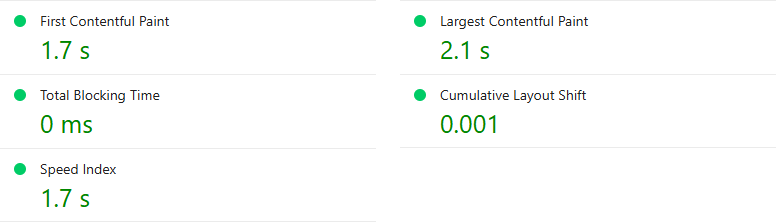
Select the image to open it at full size.
Recorded measurements in text
- First Contentful Paint
- 1.7 s
- Largest Contentful Paint
- 2.1 s
- Total Blocking Time
- 0 ms
- Cumulative Layout Shift
- 0.001
- Speed Index
- 1.7 s
Chapter 07
Rendered content and structured data
Check that the delivered page and its machine-readable description agree.
The WordPress editor is where you author content. The public page is what visitors receive. Between them sit templates, plugins, caching, and sometimes another frontend. Inspect the delivered result when something important disappears, duplicates, or changes meaning. A correct editor field is not sufficient evidence that the intended output reached the page.
For the example service page, compare the heading, opening explanation, main image, and inquiry action in the editor with the signed-out page. Then inspect the title, description, canonical, and structured data in the output. Record missing or contradictory values separately. This keeps a visible-content problem from being confused with a metadata problem.
Read structured data as a description
Structured data should describe what the page actually contains. Google’s policies require relevant, representative information and make clear that valid markup does not guarantee a rich result. The structured-data policies are the starting point; eligibility for a particular feature also depends on its current documentation.
For a service page, first ask which entities and facts are genuinely present. The business, the page, and a breadcrumb trail may be relevant to the site’s chosen schema implementation. Do not add ratings, reviews, qualifications, or locations that the business cannot substantiate. A larger graph is not inherently a more accurate description.
The relationship diagram below is an explanation of a small graph, not a promise that each node produces a search enhancement. Keep identifiers consistent within the site’s implementation so you can understand which page, organization, or item a reference names. When inspecting output, look for conflicting descriptions from multiple generators as well as basic syntax errors.
Investigate duplication at its source
If two systems emit competing descriptions, identify both before disabling anything. The theme may own one part of the page while a plugin supplies another. Custom code may remain from an older configuration. Make a copy of the current output, locate the relevant settings or code, and test a controlled change in an appropriate environment.
After the change, inspect more than one URL. A fix that improves the service template could remove useful output from articles or products if the configuration was broader than expected. Check both the visible page and the generated data. Save enough evidence to show what was removed and what now supplies the intended information.
Keep headless and commerce questions bounded
If WordPress supplies content to another frontend, inspect the public frontend’s response. A value present in WordPress is not proof that the other application renders it. Assign responsibility for titles, canonicals, directives, and structured output explicitly between the systems, then test the public URLs readers use.
For a commerce template, include the actual product state in the investigation. A generic article check does not establish that product variants, availability, and page output agree. Follow the current documentation for the commerce software and relevant search feature before applying a template-wide rule.
Finally, keep a brief output contract for each major page type: the visible content that must be present, the metadata owner, the expected canonical pattern, and the structured facts it can truthfully emit. That record makes future theme, plugin, or frontend changes much easier to verify.
Describe the same reality
Page, business, and reading path
- WebPage
The current public URL and its actual subject.
- Organization
The business described by verified site information.
- BreadcrumbList
The reading path represented by the visible breadcrumb.
From running software
Inspect the response that was delivered
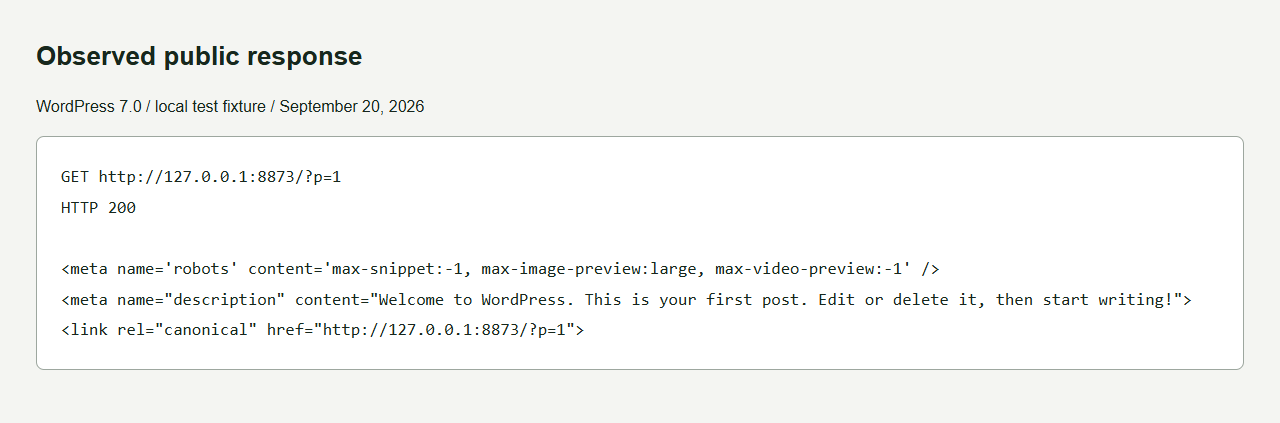
Select the image to open it at full size.
Read the selected response tags
<meta name='robots' content='max-snippet:-1, max-image-preview:large, max-video-preview:-1' />
<meta name="description" content="Welcome to WordPress. This is your first post. Edit or delete it, then start writing!">
<link rel="canonical" href="http://127.0.0.1:8873/?p=1">Chapter 08
Run a WordPress technical audit
Convert scattered warnings into a short list of reproducible findings.
A useful audit connects an observation to an action and a way to check the result. It does not need to begin with a crawl of every possible URL. Start with the pages and templates that matter, then widen the investigation when evidence points to a pattern. Keep a distinction between confirmed faults, open questions, and optional improvements.
Build a small URL sample: the home page, a service or product, an article, an archive, an old address that should redirect, and an address that should not exist. Add special page types the site actually uses. Record why each example belongs in the sample. This makes the audit repeatable after an update and prevents a convenient sample from being mistaken for complete coverage.
Use the same sequence for each URL
First check the response and final address while signed out. Then inspect visible content, indexing controls, the canonical, and the page’s internal access path. If structured data is relevant, inspect its facts and ownership. Finally, test the page on a narrow screen and note a specific performance or interaction problem if one is present.
When you have access to Search Console, compare the site’s current output with the relevant inspection information. Use the tool’s distinction between the indexed version and live testing; neither a request for indexing nor a successful test promises appearance in results. Refer to URL Inspection help when a report’s meaning is unclear.
Write findings someone can act on
“Canonical problem” is too vague. A better finding is: “The current garden-design page names the retired service URL as canonical. The retired URL redirects back to the current page.” Attach both observations, identify the generator, and state the expected consistent output. A developer can reproduce that finding without interpreting your intentions.
Include a proposed owner. Delivery failures may belong to the host or developer. Missing explanations belong to the editor or subject specialist. A retired service destination may need a business decision before anyone writes a redirect. If the owner is unknown, make that the next action instead of assigning the problem to the nearest plugin.
Prioritize by consequence and confidence
Deal first with confirmed failures that prevent an important task or hide intended public content. Then address contradictions shared across templates. After that, improve pages where the evidence shows a clear gap. This is an editorial ordering rule, not a numeric forecast of search impact. The site’s commercial priorities and release constraints still matter.
Do not combine several speculative fixes into one large change. If you rewrite a page, change its URL, switch schema generators, and alter crawling rules together, it becomes harder to explain what caused a later observation. Keep changes reviewable, retain the previous configuration, and use the site’s normal backup and deployment process.
Close the loop
Every completed finding needs verification. Link to the new response, output capture, or interaction check and record the date. For broader changes, retest the original sample and an unaffected control page. Leave search outcomes open until you have measured them separately.
The worksheet below is deliberately small. A finding can be serious without a dramatic score, and a warning can be harmless when it describes an intentional choice. Your job is to establish which is which, explain the consequence, and leave the next person enough evidence to continue the work.
An actionable finding
From symptom to verification
- Observation
- Current service page names the retired URL as canonical.
- Evidence
- Saved HTML from the current URL and redirect response from the old one.
- Owner
- The person maintaining the canonical generator.
- Action
- Align the generated canonical with the intended current page.
- Verification
- Fetch both URLs and inspect another page using the same template.
Part 02
On-page SEO
Give each page a clear purpose and a useful answer.

Chapter 09
Search intent and page purpose
Decide which question a page should answer before editing its title or counting words.
A page becomes easier to improve when you can finish this sentence: “Someone comes here because they need to ____, and afterward they should be able to ____.” For the garden-design service, the visitor might need to understand whether the business can plan a small urban garden and what an initial conversation involves. For a planting guide, the task might be choosing a suitable starting point for research. These are related interests, but they need different answers.
Search intent is a useful shorthand for the task behind a query. It is not permission to guess a visitor’s circumstances. Gather evidence from the questions customers actually ask, the services you provide, site-search records where available, and relevant search results you inspect. Write down which observations support the proposed page. Keep assumptions recognizable.
Choose the page type that serves the task
A service page should help someone evaluate the service and take an appropriate next step. A practical guide should explain how to do or understand something. A comparison should give the criteria needed to choose. If the page mixes all three without a clear order, decide which job comes first and link to the others where useful.
For the example site, “garden design consultation” suggests a different page brief from “how to measure a small garden.” We are using those phrases as illustrative questions, not reporting keyword volumes. The first page might explain scope, preparation, and the inquiry process. The second might show a measurement method, common obstacles, and the point at which professional advice becomes useful.
Use results as evidence, not a template to copy
If you inspect search results, note the date, location context, and types of pages present. Ask what the results reveal about possible reader expectations. Do not copy their headings and call the resulting outline original research. The useful question is what your page can explain accurately and specifically for its audience.
Google’s helpful-content guidance encourages content made for people and grounded in useful experience or knowledge. Apply that principle by identifying the material you can contribute: a documented process, a clear example, an original explanation, or an answer based on real business practice. An assistant can help organize supplied material, but someone still needs to verify it.
Resolve overlap before publishing another page
List the pages that already touch the question. Compare their intended audience, depth, and next step. Two pages can share vocabulary while doing different jobs. Conversely, two differently titled pages can compete for the same editorial purpose. Decide whether to improve an existing answer, separate genuinely distinct tasks, or combine redundant material.
A useful brief includes the reader’s question, what the page will cover, what it will deliberately leave to another page, and the evidence required. Add the internal links that will connect it to the rest of the site. This makes the brief usable by an editor, a subject specialist, or an assistant without asking them to infer the whole strategy.
Review the brief against the finished page. If a visitor still cannot complete the stated task, additional keywords will not repair the missing answer. Return to the explanation, examples, and decision points. For a deeper discussion of framing questions, read from keywords to questions.
Example page briefs
One question, one primary job
- Can you plan my garden?
Service page: scope, suitability, process, and inquiry.
- How should I prepare?
Planning guide: measurements, constraints, and decisions.
- What should I research for this season?
Resource: a documented starting point with local limitations.
Chapter 10
Build a page that answers the question
Make the promise clear, support it with evidence, and explain the next step.
The opening of a page should help a visitor decide whether they are in the right place. Explain the subject and what they can learn or do here. On the garden-design service page, a broad statement about beautiful outdoor spaces tells us little. A concrete explanation of the planning service, its suitable projects, and the information needed for an inquiry gives the visitor something to evaluate.
Start by gathering source material from the business. Ask for the actual process, common questions, scope boundaries, examples they are allowed to show, and any constraints that affect a customer decision. Do not let a persuasive draft invent the evidence it needs. If a fact is missing, flag it for the person who knows.
Organize the answer around decisions
For the example service, an effective sequence could be: what the service includes, who it suits, what happens during planning, what the customer should prepare, and how to ask about a project. This is an editorial proposal, not a compulsory SEO heading pattern. A different service might need costs, compatibility, or eligibility explained much earlier.
Use headings that describe the passage beneath them. “What to prepare for a consultation” is more useful than “Discover the possibilities” when the section is a preparation checklist. A reader scanning the headings should be able to predict where an answer lives. Keep the heading hierarchy understandable and check how it is rendered in the public template.
Put evidence beside the claim it supports
If the business describes a project, explain what was actually done and what the image shows. If it gives a recommendation, explain the conditions under which that recommendation applies. If it cites research, link to the original source and describe the relevant limits. The evidence should help a reader evaluate the statement without navigating a maze of promotional copy.
Google’s content guidance discusses original value, sourcing, and demonstrable knowledge. A practical editorial test is to ask which sentences could have been written without knowing anything about this business or task. Replace empty generalities with verified detail where it helps the decision.
Make the next step proportionate
A service page may invite an inquiry. A guide may suggest a worksheet or another explanation. Put that action where the reader has enough information to choose it, and say what will happen. “Send your site measurements” and “Book a consultation” are different promises. Use the action the business can actually support.
Check the page on a phone and read it aloud. Long paragraphs, unclear pronouns, and repeated introductions become obvious when you cannot rely on the overall desktop composition. Test the next-step link and any form. A useful explanation followed by a broken action still leaves the task unfinished.
Review with a real question
Ask a colleague unfamiliar with the draft to find the scope, explain the process, and identify the next step. Their hesitation is editorial evidence. It does not establish a ranking effect, but it tells you where the answer is difficult to use.
The before-and-after example below changes specificity and organization. It does not invent results, qualifications, or pricing for our fictional business. Use the annotations to evaluate your own draft, then supply the real details that only your organization can verify.
An editorial example
Give the reader something to evaluate
Before
Bring your dream garden to life
We create beautiful spaces with a passion for excellence. Discover our solutions and transform your outdoor living.
The gap: the reader cannot tell what is included, whether the service fits, or what happens next.
After
Plan a small garden around how you use it
A garden-design consultation starts with the space, the people using it, and the changes you want to make.
- Establish the scope: explain which planning decisions the actual service covers.
- Explain preparation: identify the measurements and photographs the business really needs.
- Describe the next step: tell readers how an inquiry is reviewed and what happens afterward.
Chapter 11
Titles, descriptions, and search presentation
Describe the page accurately and understand what a preview can and cannot tell you.
A title helps identify a page. A description can summarize why someone might want to visit it. Write both after you understand the page’s purpose. If you cannot summarize the answer clearly, return to the content rather than trying increasingly clever wording in the metadata fields.
For the garden-design service, “Garden design consultations | Example Garden Studio” is an illustrative starting point. Its usefulness depends on whether consultations are actually the service described. A title advertising an instant quote would be misleading if the next step is a preliminary inquiry. Accuracy matters before attractiveness.
Distinguish authored fields from displayed results
Google generates title links from several sources and may show wording different from the HTML title. Its title-link guidance recommends descriptive, concise titles and discusses common problems such as repetition and mismatches. Treat the title field as an important input, not control over every displayed result.
Google may use a meta description when it considers that summary suitable, but snippets can also come from page content and vary with the query. Its snippet guidance does not set a fixed character limit for meta descriptions; display length depends on factors such as device width. A preview should therefore help you examine wording, not issue a universal pass or fail at a particular character count.
Edit for meaning first
Draft a title that identifies the subject and, where useful, the distinguishing scope. Read it without the rest of the website. Could someone tell which page it names? Compare it with neighboring titles. If every page begins with the same long phrase, the specific subject may be hard to distinguish in a list.
For the description, summarize the actual information or service. Give a reader a reason to choose the page that the page can fulfill. Avoid a string of related keywords, a promise unsupported by the body, or an action that does not exist after the click. A good summary can be plain.
Review templates as well as individual fields. If a business name appears twice, inspect whether a template appends it to a value that already contains it. If a saved description does not appear in output, find the source of that output before repeatedly editing the field. Preview tools and editor controls are useful, but the published HTML is the thing to verify.
Make batch changes reviewable
When several pages need attention, export or record their current values and draft a small group first. Check the drafts against the actual content. Look for repeated wording, accidental promises, missing subjects, and titles that became ambiguous when shortened. Have the relevant editor review the examples before extending the pattern.
After saving, inspect the public page and a second page using the same template. Retain the old values through the site’s normal change-control process. Keep a note of the edit date if you later compare search appearance or click data. Other changes and different queries can affect those observations, so do not attribute every difference to the new description.
The tool below changes an illustrative title and description locally in your browser. It neither updates WordPress nor reproduces a particular search engine result. Use it to compare clarity at two widths, then verify the actual fields and output on your site.
A local writing tool
Try your title and description
garden.example / garden-design
Garden design consultations | Example Garden Studio
Understand the garden-design process, what to prepare, and how to ask about a project.
Chapter 12
Internal links and supporting content
Connect pages where the next answer is useful to the reader.
An internal link gives a reader a route to another page on your site. Start with the reason someone would follow it. A planning guide might link to a measuring worksheet at the moment measurements become necessary. The service page might link to that guide when a prospective customer wants to prepare. These links have a clear editorial job.
Draw a small map around one important page. Include the pages that currently point to it, the pages it references, and any useful answer that sits outside those paths. This is often enough to reveal an isolated resource or a missing transition. You do not need to turn the whole site into a dense web of links between every page.
Use link text that describes the destination
Google recommends crawlable links implemented with an anchor and an href, and anchor text that helps explain the linked page. See its link guidance. For an editor, the practical task is to make the link meaningful in its sentence and check that it leads to the promised answer.
“Measure your garden before the consultation” gives more context than “click here” when the destination is a preparation guide. Do not force the same phrase into every paragraph merely because it resembles a target query. Read the sentence naturally. The link should remain useful if the visitor knows nothing about your SEO plan.
Repair the paths you control
Start with links in the main navigation and important body content. Follow them while signed out and note redirects, missing destinations, or mismatches between the anchor and the answer. If a destination moved, update the source link where you can instead of relying forever on a chain of older addresses.
Review related-content sections with the same care. An automatically selected article may share a category while answering an unrelated question. Curate important relationships when the template’s default list is not enough. Keep the list small enough that each option is understandable.
For the garden example, the service page can point to the planning guide, and the planning guide can point to the seasonal resource where it discusses planting considerations. The resource can explain when a site-specific plan is needed and link back to the service. The routes are justified by the content; they are not a circular linking requirement.
Find pages without a useful entrance
Compare the pages you want people to use with the links they can follow from relevant parts of the site. If a resource appears only in a sitemap or an obscure archive, consider where a contextual introduction belongs. Adding a link from a popular but unrelated page may create a path without helping the reader.
When new content is published, make inbound links part of the publishing checklist. Ask which existing passages now need this answer. That is a concrete maintenance task an editor can complete and verify. It also avoids expecting the new page to become connected merely because it exists.
After editing, follow each changed link, inspect the destination at mobile width, and read the surrounding paragraph again. The network diagram below shows a small authored example, with no invented calculation of authority or link equity. Its purpose is to make useful reading paths visible.
Useful reading paths
Connect the next answer
Chapter 13
Images and accessible explanations
Choose an image for a reason, then explain the information it contributes.
An image should help someone understand, evaluate, or navigate the page. A project photograph may show the physical result of a service. A diagram may explain a sequence that is awkward to describe in one paragraph. A decorative collage may provide a visual landmark without adding factual information. These roles need different treatment.
Choose the image’s job before writing its alternative text. The W3C’s alt decision tree distinguishes informative, functional, and decorative uses. A purely decorative image can have an empty alternative. An image that communicates information needs an equivalent appropriate to its context. An image used as a control needs its function to be understandable.
Describe what matters here
Imagine a photograph of a narrow garden path. On a page about a landscaping project, the material, width, or planting arrangement might matter. On a page where the same image is a purely decorative background, repeating those details may add noise. Alternative text is not a catalog description detached from the page.
Do not use the field to insert a list of search phrases. Ask what someone would miss if they could not see the image. For a complex diagram, a short alternative may identify the subject while nearby prose or a table supplies the complete explanation. Keep the information available without requiring someone to infer it from colors or small visual labels.
Use captions for context and evidence
A caption can identify the project, explain the relevant detail, and distinguish a real capture from a teaching illustration. Do not present a generated image as a photograph of work the business completed. If the image is an example, say so where that distinction matters. If the business supplied a project image, confirm the permission and factual description before publishing it.
For our fictional garden site, we cannot invent a completed customer project and use the picture as proof. We can show an explicitly illustrated planning example and explain its purpose. A real business should replace that example with material it can substantiate, or write the page without pretending the evidence exists.
Preserve usefulness on a small screen
Inspect diagrams and screenshots at the width readers will actually use. If annotations become too small, simplify the visual, provide a larger self-hosted version, or put the explanation in nearby text. Cropping a screenshot can make the relevant control clearer, provided the crop does not hide context necessary to understand it.
Check image delivery as part of the page, too. Reserve the image’s space, use dimensions appropriate to the layout, and avoid sending an unnecessarily large source to a small viewport. Do not sacrifice the detail needed to read the image just to reduce a byte count. Review both the transferred asset and its visible result.
Verify the published alternative
After editing an image in WordPress, inspect the public markup and the reading experience. A media-library value and the value attached to a particular placement may not be the same thing in every workflow. Confirm what that placement actually emits. For a linked image, make sure its destination or action remains understandable.
Finish by reading the surrounding section without relying on the pictures. Can someone still understand the decision and complete the task? If the answer requires seeing a tiny label, add the missing explanation. That check improves the guide for readers using assistive technology, small screens, or an unreliable connection.
Context changes the answer
What does this image do here?
- Informative
A plan shows the route of a garden path. Explain that information in text.
- Functional
An image opens the full plan. Its accessible name explains the destination.
- Decorative
A paper collage marks a chapter. It contributes no instructions, so use an empty alternative.
From running software
Three fields with different jobs
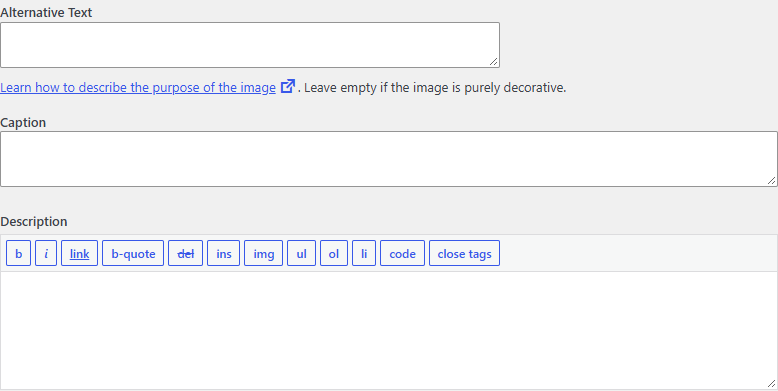
Select the image to open it at full size.
Chapter 14
Updating, combining, and reviewing pages
Maintain an answer because something changed, not because a date looks old.
Start a content review with the page’s job. Is the explanation still accurate? Does the service still exist? Have customer questions changed? Are examples, instructions, or links out of date? A useful update responds to one of those findings. Changing the displayed date without improving the substance does not answer the reader’s problem.
Build a small inventory with the URL, purpose, content owner, last substantive review, and observed issue. Add evidence such as a broken reference, an obsolete instruction, or repeated questions the page fails to answer. Traffic can be one input where you have reliable data, but a low number alone does not tell you whether to rewrite, combine, or remove a page.
Choose between keeping, improving, and combining
Keep a page when it still answers a distinct question accurately. Improve it when its purpose is sound but the explanation or evidence is incomplete. Consider combining pages when their jobs substantially overlap and a single maintained answer would serve the reader better. Before removing a URL, inspect its current links and decide what should happen to visitors who still use it.
For the example site, a guide to measuring a garden and a guide to preparing for a consultation might be distinct. Two short pages both explaining what happens at the first consultation may be redundant. Compare their actual contents before choosing. A shared keyword or a low word count is not enough to establish duplication.
If a combination changes URLs, use the same mapping and verification process as any other move. The canonical guidance explains consolidation signals, but it does not make the editorial decision for you. Decide which answer belongs where before implementing the technical handling.
Preserve useful detail during a rewrite
Capture the current content, metadata, links, and any embedded functionality. A rewrite can accidentally remove a practical example, a form, or a detail that a sales team relies on. Ask the subject owner which parts are still useful and which need correction. Keep a record of what changed and why.
Draft against the new brief, then compare the result with both the brief and the old page. Did the new opening become clearer while losing an important limit? Did shorter copy make the service sound broader than it is? Did an assistant introduce a statistic or a claim that nobody supplied? These are review questions, not tasks a readability score can settle.
Separate drafting from publishing
Use the site’s normal review process for changes that affect customers or important destinations. If you use an assistant, give it the verified source material and ask for a reviewable draft. The person responsible for the business facts should check them before publication. Do not assume that any tool’s ability to write a field means the change has been approved.
After publishing, inspect the page while signed out. Check headings, links, images, forms, and generated metadata. If a template changed, inspect another page that uses it. Record the substantive review date and leave a short note explaining the reason for the update.
Set the next review according to how quickly the subject changes. A software procedure may need a check after a release; a stable explanation may need attention only when new evidence or questions arise. Google’s helpful-content guidance is a useful reference, but the schedule should follow the actual maintenance burden of your material.
Content review
Choose the action from the evidence
- Still accurate and distinct
- Keep it. Record the review without inventing an update.
- Useful purpose, missing answer
- Improve the explanation or evidence.
- Same task, redundant pages
- Consider combining; inspect links and plan URL handling first.
- Obsolete with no equivalent
- Decide the removal behavior; do not redirect to an unrelated page.
Part 03
Off-page SEO
Create reasons for other people to reference your work.

Chapter 15
Links, mentions, and reputation
Look for relevant references and useful relationships you can explain.
Off-page SEO begins outside the controls in your WordPress dashboard. It includes the ways other websites and people reference your work: links, mentions, relevant listings, partnerships, and recommendations. These observations are not interchangeable. A linked resource, an unlinked mention, and a customer referral tell you different things.
Start by identifying the audiences that have a reason to care about your material. For our fictional garden business, those might include a local gardening group, a relevant professional partner, or a publication answering a planning question. This is a hypothesis to investigate, not a list of organizations we claim have endorsed the business.
Separate relevance from a vendor’s score
If a tool assigns a score to a domain or backlink opportunity, understand what the vendor says it measures. Do not assume it is a score used by a search engine or a prediction of business value. You can make a more grounded first assessment by reading the actual page, understanding its audience, and identifying the reason your resource belongs there.
Ask whether a visitor would benefit from following the reference. Is the surrounding content relevant? Is the destination accurate and useful? Does the site appear to exercise editorial judgment? Is a payment or reciprocal arrangement the real basis of the placement? Keep the answers in your notes rather than collapsing them into an unexplained number.
Google’s spam policies describe link spam, including arrangements intended to manipulate rankings. Review those policies before buying or arranging placements. A claim that a package is “safe” is not a substitute for understanding the actual method and relationship.
Build the thing worth referencing first
The garden business might create an observation worksheet that helps a reader prepare useful information before a planning conversation. The resource needs a clear purpose, usable instructions, an accessible format, and honest limits. Outreach cannot supply those qualities afterward. If the destination disappoints the reader, the reference has not created much lasting value.
Useful material can be modest. An accurate explanation of a frequently misunderstood process, a maintained local reference, or a reproducible method may be more appropriate than a grand industry report without data. Choose something the organization can produce and maintain well. The next chapter develops a resource brief.
Keep reputation attached to real behavior
Recommendations and reviews should reflect genuine experiences. Do not fabricate them, trade misleading endorsements, or describe conceptual artwork as completed customer work. If someone makes an inaccurate claim about your business, a factual correction may be more useful than asking for a link.
For relevant listings, check the public business information and the purpose of the listing. Maintain information that helps customers identify and contact the right organization. Do not expand into hundreds of unrelated directories simply to increase a count. The useful question is whether the listing serves an actual audience and describes the business correctly.
Keep an opportunity log with the source, audience, possible contribution, evidence, and next action. A decision to decline an unsuitable placement is a valid outcome. The matrix below gives examples of that judgment without inventing a backlink quota or authority threshold. For the distinction between links and broader AI-related claims, see brand references and backlinks.
Opportunity review
A relevant reference has a reason
| Opportunity | Audience fit | Evidence to inspect | Decision |
|---|---|---|---|
| Local gardening association | Readers planning gardens | Its actual resources and contribution policy | Investigate a useful resource contribution |
| Unrelated bulk directory | No clear reader task | Listings and the reason for paying | Do not buy based on a score |
| Relevant professional partner | Complementary customer need | Real relationship and accurate service information | Discuss an appropriate reference |
Chapter 16
Create resources that deserve a reference
Offer something a relevant reader can use, inspect, and cite accurately.
A resource deserves consideration because it helps a particular audience do something. Begin by naming that task. “An impressive infographic about gardens” is a format idea. “A worksheet that helps a homeowner record the site information needed for a planning conversation” is a useful brief. You can choose the format after the job is clear.
For the fictional business, the resource could ask readers to record dimensions, access constraints, sunlight observations, and questions for a designer. The business would need to verify the instructions before publishing them. A seasonal version would also need a clear geographic and climatic scope. A universal planting calendar would make promises the example cannot support.
Specify the contribution
Write down what the resource adds beyond material already available. It might make a difficult procedure easier to follow, collect a maintained set of primary references, or explain observations from a documented project. Be precise about the contribution. Rearranging other people’s claims into a new graphic is not original research.
If you collect data, record the population, selection method, dates, definitions, and exclusions before presenting a result. Preserve the underlying observations where lawful and appropriate. Explain uncertainty and the limits of the sample. A small, well-described study can be useful; an unlabeled convenience sample presented as an industry truth is misleading.
If you do not have original data, build a resource that does not pretend to. A blank worksheet, an annotated process, or a carefully sourced explanation can stand on its own. Put citations beside borrowed factual claims and distinguish your recommendations from the source’s findings. Do not add a chart merely because a chart makes the page look researched.
Design for use and citation
Give the resource a stable URL, a descriptive title, an organizational owner, and a substantive review date. Explain how to use it before asking anyone to download it. A useful HTML version makes the answer available without requiring a particular application. A printable version can support an offline task, provided it remains legible and complete.
For charts, expose the units and the data behind the marks. For worksheets, explain what belongs in each field. For instructions, show an example that readers can distinguish from their own required inputs. Add text alternatives to meaningful visuals and avoid embedding all the instructions in an image.
Test with the intended reader
Ask someone who resembles the audience to use the resource for its stated task. Watch where they need extra explanation. If the worksheet asks for a measurement they cannot identify, revise the instruction or add a diagram. If a term is ambiguous, define it where the decision occurs.
This kind of feedback is a usability observation, not a customer-success statistic. Record what you learned without inflating the sample. Keep the revised resource and its method together so an external publisher can understand what they would be referencing.
Plan for maintenance before outreach
Decide who will correct errors, check external references, and update time-sensitive details. If the organization cannot maintain a changing dataset, choose a narrower resource or label the period it covers. Broken downloads and stale instructions weaken the usefulness of an otherwise relevant reference.
Once the resource works, identify a small number of places where it could answer an existing audience need. The outreach then has something specific to say. You are offering a usable contribution, with a method and limits another person can inspect, rather than asking for a link to an empty promise.
A resource brief
Make the value inspectable
- Audience
- People collecting information before planning a small garden.
- Useful output
- A printable observation worksheet: light, space, access, and questions.
- Evidence
- A documented method, reviewed instructions, and clearly stated limits.
- Maintenance
- A stable URL, a named organizational owner, and a substantive review date.
Chapter 17
Relevant outreach and partnerships
Make a specific approach to someone whose audience could use the resource.
Start with the publication or organization, not a template message. Read the page or resource collection where your contribution might fit. Identify its audience, its existing coverage, and any stated submission process. If you cannot explain the fit in a sentence, you are not ready to contact someone about it.
For the fictional garden business, a relevant association might maintain a preparation guide for new members. A measurement worksheet could be useful if it fills a real gap in that guide. The same worksheet may be irrelevant to a general business directory. The topic of the entire domain is less informative than the purpose of the specific page and its readers.
Keep the approach concrete
A useful message identifies the relevant page, explains the resource briefly, and gives the recipient enough information to decide whether it helps. Do not imply you read work you did not read, invent a relationship, or promise a reciprocal placement without a clear business reason. Respect the site’s submission instructions and the recipient’s response.
An example message might say:
Your preparation guide asks readers to bring site measurements. We have made a printable worksheet that helps organize those observations before a planning conversation. It includes a filled example and explains its limits. If that would help your readers, the worksheet and method are available at the linked page. Corrections are welcome.
This is a fictional writing example, not an email being sent. Before using it, replace every statement with something true about the recipient and your resource. Keep the actual message short enough that the relevance is easy to evaluate. Do not claim a recommendation or partnership exists before it does.
Evaluate a partnership on its real purpose
A complementary professional may have a genuine reason to reference your service or resource. Discuss what information customers need and which party is responsible for keeping it accurate. A useful collaboration might produce a joint explanation or a clear referral path. It does not require a mandatory exchange of keyword-rich links across every page.
If money, products, or another commercial arrangement is involved, describe that relationship accurately and use appropriate link qualification. Google’s outbound-link guidance explains sponsored, ugc, and nofollow. Its spam policies address manipulative link arrangements. Read the policies in the context of the actual proposal.
Keep the workflow small and reviewable
Record the source URL, audience, proposed contribution, contact route, message, and outcome. A small relevant list is easier to review than a bulk list whose entries nobody has read. Have a person check the resource and message before sending. An assistant can help summarize public submission instructions or draft from verified notes, but it should not invent personalization.
If a recipient corrects a fact, investigate and improve the resource. If they decline, record that and respect the decision. Do not turn follow-up into persistent unwanted contact. A useful relationship depends on the contribution and conduct, not merely the number of attempts.
After a reference appears, inspect it and the destination. Make sure it describes the resource accurately and still leads to a working page. Keep the source in your maintenance record so a later URL change does not break the path you worked to establish.
A manageable sequence
Relevance comes before contact
- 01 / Find the fit
Identify a specific audience and an existing need.
- 02 / Check the resource
Verify the method, facts, accessibility, and destination.
- 03 / Make a specific approach
Explain why this resource could help this audience.
- 04 / Record the outcome
Keep the response, corrections, and useful next steps.
Chapter 18
Existing mentions and broken inbound paths
Preserve useful references and correct the destination before asking for more links.
Existing references are often a practical place to begin because you can inspect what already happened. A publication may mention the business without linking. An old article may point to a worksheet that moved. A partner may still use a retired service URL. Each case needs a different response, and some need no response at all.
Open the source page and read the surrounding context. Confirm that the reference is actually to your organization or resource. A matching name alone can be ambiguous. Record the source URL, the destination if there is one, what the passage promises, and the date you checked it. That record prevents an outreach request from being based on a misleading tool summary.
Decide whether a link would help
An unlinked mention does not automatically create an obligation to add a link. Ask whether a reader needs a destination to verify a claim, use a resource, or identify the right business. If the mention is incidental and the destination adds little, a request may not be worthwhile. If the mention is factually wrong, a correction may matter more than the link.
When a link would help, make a concise request that identifies the exact passage and the appropriate destination. Let the publisher decide. Do not claim ownership over their editorial choices or suggest that an existing mention proves an endorsement. Keep the proposed destination tightly connected to what the passage says.
Repair a broken destination you own
For an inbound link to an old URL, establish what the page originally provided and whether a real replacement exists. If the old measuring worksheet became a more complete measuring guide, a move to that guide may preserve the reader’s task. A redirect to a generic home page may not. Google’s status-code and canonicalization documentation helps explain the technical handling; equivalence is still an editorial decision.
Use the URL map from the technical section. Record the old address, replacement, reason, and verification result. Implement the change through the system that owns redirects, following the site’s normal review and backup process. Check that a broad rule does not capture unrelated paths or create a loop.
Verify from the original source
Do not stop after opening the destination directly. Follow the link from the actual referring page, through every redirect, to the final answer. Check the experience on mobile and while signed out. A destination behind an unexpected login, a missing download, or a confusing error page still breaks the intended task.
If the source is under your control, update its link to the current address. If someone else maintains it, a factual update may help reduce reliance on the old route. Keep the redirect where appropriate for other references you cannot identify or change. Do not assume that fixing one source has found every inbound path.
Keep maintenance connected to future changes
Before the next content cleanup or URL migration, review the references you recorded. A popular worksheet or partner destination may deserve special care even when the site owner is focused on a new navigation structure. The evidence gives the editor a reason to preserve the task rather than judge the page only by its appearance in the current menu.
This work produces a concrete result you can verify: the original reference reaches the intended resource. Any effect on search visibility is a separate observation. Record it if you have evidence, but do not infer it merely because the link path now works.
Preserve the reason for the visit
Repair the destination, then test the source
/old-measuring-guide//old-measuring-guide/redirects to its real replacement/measure-your-garden/Chapter 19
Paid placement and off-page measurement
Understand the relationship behind a link and measure outcomes without inventing causes.
When a proposed placement involves payment or another commercial benefit, examine the arrangement before evaluating its promised metrics. What is being purchased: advertising exposure, access to an audience, a listing, or a link intended to influence search rankings? Those are different propositions. The wording in a sales pitch may blur them, so ask for the actual placement and relationship.
Google recommends rel="sponsored" for paid or sponsored links; nofollow remains acceptable for qualifying them. ugc identifies links in user-generated contexts. See Google’s link-qualification guidance. The broader spam policies explain practices considered manipulative. Neither a vendor’s label nor a private score establishes compliance.
Keep commercial decisions explicit
A relevant advertisement can have a business purpose without being sold as a ranking shortcut. Evaluate the audience, cost, placement, disclosure, destination, and measurement available. Do not treat an ordinary advertising purchase as independent editorial recognition in your own reporting. If the commercial relationship is unclear, resolve it before making claims about the placement.
For our example, sponsoring a relevant event and receiving a sponsor listing would be a commercial relationship. A publication independently choosing to reference the measurement worksheet would be a different kind of event. Record the distinction. A combined count called “authority gained” would conceal information the business needs to assess the work.
Define the outcomes you can actually observe
You may be able to record a new reference, visits from a source, use of a resource, or a useful inquiry. State which system supplies the observation and what it misses. If a visitor later returns through another route, simple attribution may not capture the original discovery. If no suitable measurement is installed, do not invent a precise conversion report.
Use existing privacy and consent practices when collecting business outcomes. This guide does not require adding a tracker or sharing customer details with another service. A small organization can begin with a carefully maintained reference log and the information already available through its normal operations.
Compare like with like
When reviewing a period, note the dates, the resources involved, and other changes that could matter. A seasonal business may receive different demand at different times. A rewritten page, a product change, or a separate advertising campaign may overlap with outreach. These observations do not make measurement pointless; they define how cautiously to interpret it.
If search traffic changes after a new link appears, record both events without declaring that one caused the other. A time sequence alone does not establish attribution. Prefer a narrow statement such as “the resource received a reference on this date, and the report shows these visits from that source” when that is what the evidence supports.
Use the review to decide what happens next
Ask which resources proved useful, which audiences were relevant, which placements were accurately represented, and which activities cost more effort than their observed value justified. A correction, a useful relationship, or a decision to stop an unsuitable tactic can all be worthwhile results.
Keep ranking observations, referral observations, and business outcomes in separate columns. The worksheet below is designed to preserve those distinctions. For a broader discussion of search measurements, read what a ranking position does and does not tell you. The point is to make the next decision more informed, not to make every activity look successful.
Keep observations separate
What happened, and what does it establish?
- A resource was referenced
- Record the source URL, destination, context, and date.
- A referral visit was recorded
- State the measurement system and its attribution limits.
- A useful inquiry arrived
- Record the business outcome using the site's existing privacy practices.
- Search traffic changed
- Compare like periods and other changes; timing alone does not establish the cause.
| Context | Relationship guidance |
|---|---|
| Paid or sponsored placement | Google recommends rel="sponsored"; nofollow remains acceptable. |
| User-generated content | rel="ugc" identifies links in contexts such as comments. |
| Ordinary editorial reference | Do not imply that a commercial arrangement is independent editorial judgment. |
Chapter 20
Choose and sequence the work
Select a small set of tasks with evidence, an owner, and a verification step.
You do not need to improve every part of a website at once. Begin with the problem you can describe most clearly and the page where solving it matters. Use the checklist below to select applicable work, then give each task an owner. Keep the evidence and verification columns attached when you export it so the plan remains more than a list of intentions.
Start with access and contradictions
If an intended public page fails to load or carries an unintended exclusion, investigate that before investing in its promotion. If the canonical, navigation, and redirects disagree, establish the preferred destination. These are dependencies in a practical workflow: there is little value in asking someone to reference a resource whose address is broken.
Next examine the answer itself. Does the page’s purpose match the reader’s task? Is a required explanation missing? Are the title and description accurate? Do the next-step links work? Choose the most consequential gap you can verify rather than making dozens of cosmetic edits simply because they are easy to count.
Once the resource is usable, consider who has a relevant reason to reference it. Review the audience and the contribution before drafting outreach. A healthy plan can contain work from all three areas, but their order should reflect real dependencies rather than an equal allocation of time to each category.
Keep the first batch small
For our fictional site, a first batch might inspect the service URL, correct an unintended directive if one exists, improve the consultation explanation, and connect the planning guide. A later batch might finish the observation worksheet and evaluate relevant publications. The sequence is an example, not a promise that every site needs the same tasks.
Write the expected result before implementing each change. “Service page has a clearer opening” is subjective until you say what it should explain. “The opening identifies the consultation, its intended projects, and the next step” gives the reviewer something to check. “The old worksheet URL reaches its equivalent replacement” gives the developer a testable destination.
Match the tool to the owner
WordPress configuration, editorial judgment, hosting behavior, and external relationships are different responsibilities. WP Visibility supplies tools for supported SEO tasks in WordPress; it does not perform the business’s outreach or create its reputation. The setup documentation explains configuration, and features describes the product’s scope.
An optional assistant can help inspect or draft within the access you configure. Review controls apply to supported workflows and their settings, not every possible route available to an administrator credential. Keep the person responsible for facts and publishing decisions involved. Ordinary SEO work does not require connecting an assistant.
Review the finished work against the evidence
At the end of the batch, revisit the original URLs and observations. Check the changed output, the reading experience, and any affected paths. Record what passed, what remains uncertain, and what needs a different owner. Keep later search and business outcomes separate from immediate implementation checks.
The checklist works entirely in this page. Your selections and owner edits are not submitted or saved between visits. Download the selected rows if you want to continue elsewhere, or print the full worksheet. Use a fresh copy for the next batch so the completed work remains an intelligible record.
Take the plan with you
Your SEO working checklist
Choose tasks that fit your findings. Selections and owner edits last only while this page stays open. Nothing is submitted. With JavaScript off, use your browser's print command.
- Evidence
- Status, redirects, rendered content
- Verify
- Fetch signed out and check the final destination
- Evidence
- Robots.txt, meta robots, HTTP headers
- Verify
- Recheck output and request inspection where appropriate
- Evidence
- Canonical, sitemap, internal links
- Verify
- Inspect all versions and the preferred destination
- Evidence
- Service, article, archive, product if relevant
- Verify
- Check output after template or plugin changes
- Evidence
- Field report or labeled lab trace
- Verify
- Repeat the same test and record conditions
- Evidence
- Reader question and intended next step
- Verify
- Check the title, opening, and content answer it
- Evidence
- Customer questions, genuine examples, source material
- Verify
- Ask a reader to complete the intended task
- Evidence
- Existing fields and visible page content
- Verify
- Inspect the published HTML after saving
- Evidence
- Relevant source pages and destinations
- Verify
- Follow every edited link on mobile and desktop
- Evidence
- Image context, caption, alt text, dimensions
- Verify
- Read the page without images and inspect output
- Evidence
- Audience need, original material, method
- Verify
- Have a relevant reader test the resource
- Evidence
- Specific publication, audience, and reason to contact
- Verify
- Review each message and destination before sending
- Evidence
- Referring page, old URL, equivalent destination
- Verify
- Follow the original external link through to the result
- Evidence
- Referral visits, useful inquiries, observed references
- Verify
- Compare like periods and annotate other changes
Chapter 21
Sources and next reading
Inspect the primary references and keep changing platform guidance separate from editorial recommendations.
This guide combines primary documentation with practical editorial recommendations and a fictional worked example. Chapter reference lists identify documentation checked on September 20, 2026. Search systems and software can change; follow the linked source when implementing a platform-specific behavior, particularly indexing controls, search presentation, or structured-data eligibility.
The garden business, its example URLs, the opportunity matrix, and the before-and-after draft are instructional material. They are not customer evidence. The collages are original generated editorial artwork. Numerical threshold figures identify their source and units; process diagrams describe relationships without assigning invented ranking weights.
A few terms worth keeping distinct
Crawling is fetching content. Indexing is processing and potentially retaining it for search. A canonical identifies a preferred representative of equivalent content. A redirect sends a request to another address. Alternative text supplies an image’s relevant equivalent or function in context. Attribution is the interpretation of which activity contributed to an outcome; an observation alone may not establish that cause.
For narrower discussions, continue with search intent and questions, audit priorities, or switching SEO plugins safely. AI visibility is a related subject with different observations and limits; begin with what AI visibility means rather than treating it as another name for all SEO.
If a passage is inaccurate or a reference has changed, use the site’s contact page and identify the chapter and specific issue. A useful correction includes the observed behavior, relevant software version or source, and the reason the current wording no longer fits.
- Google: how Search worksChecked September 20, 2026
- Google: robots.txtChecked September 20, 2026
- Google: blocking indexingChecked September 20, 2026
- WordPress: Reading settingsChecked September 20, 2026
- Google: canonical URLsChecked September 20, 2026
- Google: HTTP status codesChecked September 20, 2026
- Google: sitemapsChecked September 20, 2026
- web.dev: Web VitalsChecked September 20, 2026
- web.dev: metric threshold definitionsChecked September 20, 2026
- Google: structured data policiesChecked September 20, 2026
- Google: URL InspectionChecked September 20, 2026
- Google: helpful contentChecked September 20, 2026
- Google: title linksChecked September 20, 2026
- Google: snippetsChecked September 20, 2026
- Google: crawlable linksChecked September 20, 2026
- W3C: the alt decision treeChecked September 20, 2026
- Google: spam policiesChecked September 20, 2026
- Google: qualifying outbound linksChecked September 20, 2026
Put the work into practice
Keep the next change manageable.
Choose a page, collect the evidence, and verify the result. For WordPress configuration, the setup docs explain the tasks WP Visibility supports.